
T-Mobile customers across the United States started seeing “SOS” or “SOS Only” instead of their usual signal bars on the afternoon of July 27, 2026. Downdetector logged more than 140,000 reports at the peak, making this T-Mobile SOS outage one of the largest carrier disruptions in years. Here’s what actually happened, why phones switched into SOS mode, and what to do while service stays unreliable.
What Is the T-Mobile SOS Outage?
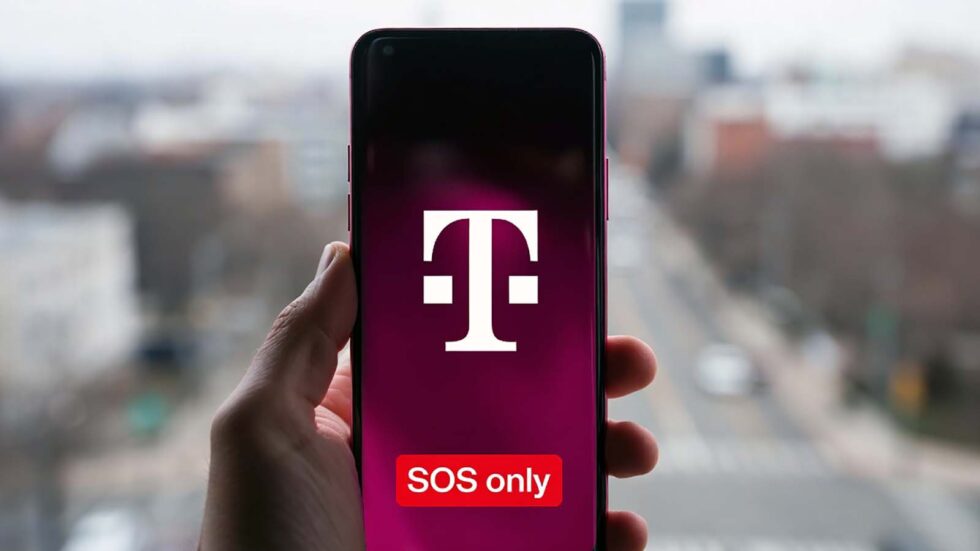
The T-Mobile SOS outage refers to a nationwide network disruption that began around 4:00 p.m. ET on July 27, 2026, when customers’ phones suddenly dropped from normal signal bars to “SOS” or “SOS Only.” Reports of trouble climbed rapidly, with users describing calls that wouldn’t connect, texts stuck in limbo, and mobile data that simply stopped working. Within an hour, Downdetector had logged tens of thousands of complaints, and by early evening the total had passed 140,000. The outage wasn’t limited to a single city or region; reports came in from across the country, pointing to a network-wide problem rather than a local cell tower issue.
On iPhones, “SOS” or “SOS Only” appears where the carrier name or signal bars normally sit. It means the device isn’t connected to its carrier’s network for regular calls, texts, or data, but it can still reach emergency services through another carrier’s towers if one is in range. Android phones show similar wording, sometimes as “Emergency calls only.” Either way, the message is the phone telling you it has fallen off T-Mobile’s network entirely — which is exactly what made this particular disruption so visible so quickly.
What Caused the T-Mobile Outage?
As of the morning of July 28, T-Mobile had not published a detailed explanation of what triggered the outage. The company has not said whether the disruption stemmed from a software bug, a hardware failure, or a configuration change gone wrong. A T-Mobile spokesperson confirmed the company was aware of the problem and investigating, but stopped short of naming a root cause.
That silence isn’t unusual in the first hours of a major outage. Carriers typically wait until engineers have identified the fault before publishing specifics, and a full post-incident report — if one comes at all — often follows days or weeks later. Until T-Mobile says otherwise, anyone claiming to know the exact cause is speculating. Social media filled the gap with theories ranging from a botched software update to a hardware failure at a core switching facility, but none of these have been confirmed.
How Many People Were Affected?
Downdetector’s complaint count climbed from a few hundred reports shortly after 4:00 p.m. ET to more than 140,000 within a few hours, spread across major metropolitan areas nationwide. The scale of the T-Mobile SOS outage also reached beyond T-Mobile’s own customers. Several mobile virtual network operators that lease capacity on T-Mobile’s network reported problems, and some Verizon and AT&T users said they couldn’t reach contacts on T-Mobile — a common side effect when one major carrier’s network falters, since cross-carrier calls depend on every network working together.
Services like Spotify and Xbox Live also saw a spike in user complaints during the same window, though that’s likely a case of T-Mobile customers being unable to reach those services over cellular data rather than a problem with the services themselves. T-Mobile’s 5G Home Internet product, which runs on the same core network as its mobile service, was also affected in several regions, leaving some households without a working internet connection at all while the outage played out.
Is This the Same as Previous T-Mobile Outages?
T-Mobile has had smaller, shorter service interruptions throughout 2026, including several incidents lasting under two hours tied to home internet and mobile connectivity. None of those approached the scale of the July 27 event. The carrier also had a widely reported SOS-mode outage in February 2023, when customers nationwide saw the same “SOS” indicator during a multi-hour disruption. That earlier T-Mobile SOS outage was eventually resolved within about a day, with the company saying service had returned to near-normal levels. The July 27 event appears to be a separate, unrelated incident, though T-Mobile hasn’t confirmed whether it shares any underlying cause with past events.
Large-scale carrier and platform outages have become a familiar pattern this year. ChatGPT went down twice in the same week in late July, and AT&T and Verizon have each had their own multi-hour disruptions in 2026. None of these incidents are connected to each other or to the T-Mobile SOS outage, but together they point to how much daily life now depends on always-on digital infrastructure — and how disruptive it is when that infrastructure briefly fails.
What Should You Do While T-Mobile Is Down?
There’s no fix on your end for a network-wide outage, but a few steps can help in the meantime:
- Turn on Wi-Fi Calling. If you have Wi-Fi access, this lets you make and receive calls and texts without a working cellular connection.
- Toggle Airplane Mode. Turn it on for 15 seconds, then off again. This forces your phone to search for a network connection from scratch.
- Restart your phone. A simple reboot occasionally reconnects a device faster than waiting it out.
- Know that SOS still allows emergency calls. If you genuinely need to reach emergency services during an outage, SOS mode should route the call through any available carrier’s towers.
- Check T-Mobile’s status page. The carrier posts updates on confirmed outages and expected resolution windows once an incident is acknowledged internally.
How to restart your iPhone or Android during the T-Mobile SOS outage
A restart is the most common fix people search for, and it’s worth doing properly before assuming your device is the problem:
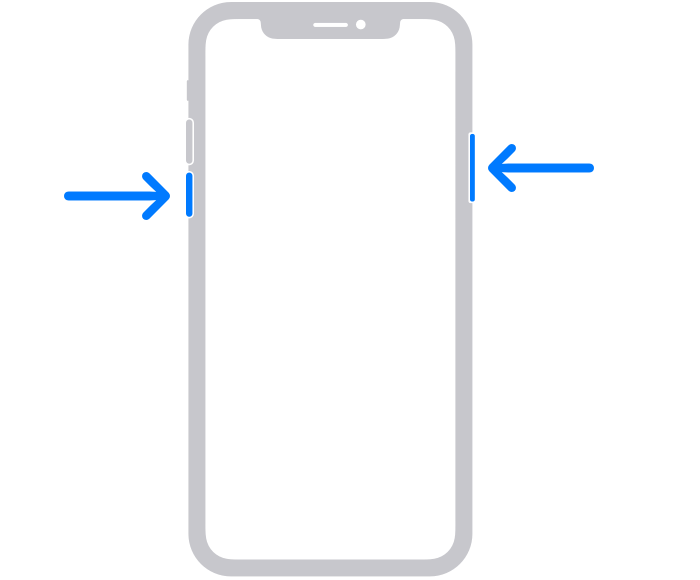
- iPhone with Face ID (no Home button): Press and hold either volume button and the side button together until the power-off slider appears. Drag the slider, wait about 30 seconds, then hold the side button again to turn the phone back on.
- iPhone with a Home button: Press and hold the side or top button until the slider appears, drag it, wait, then press the same button again to restart.
- Android phones: Press and hold the power button until the restart or power menu appears, then tap Restart. On most Android devices this brings up the same “Emergency calls only” wording that iPhones show as SOS.
If a restart doesn’t bring service back, that’s expected during an active network-wide outage — it usually means the problem is on T-Mobile’s side, not your device.
Should you reset network settings on your iPhone?
Resetting network settings is a common troubleshooting step for local connectivity issues, but during a confirmed T-Mobile SOS outage it’s unlikely to help. Network resets fix problems like a corrupted carrier profile or a stuck Wi-Fi/Bluetooth configuration on your device — they can’t restore service on T-Mobile’s end. It’s generally best to hold off on resetting network settings, replacing a SIM card, or contacting support about a “broken” phone until you’ve confirmed the outage is over, since doing so during an active outage wastes time without fixing anything.
Apple’s own support documentation confirms that an SOS or “SOS Only” status means your device isn’t connected to your regular carrier but can still place emergency calls through other networks where available. That guidance applies regardless of which carrier is having the outage, and it’s worth keeping in mind any time you see the SOS indicator, not just during this particular event.
When Will T-Mobile Service Return?
Multiple outlets tracking the outage reported that complaint volumes began dropping sharply by the evening of July 27, with many customers regaining service without taking any action themselves — a sign the carrier was actively working to restore the network rather than customers fixing anything on their own devices. Some users described service flashing in and out for a period before stabilizing, which is typical as engineers bring network elements back online in stages rather than all at once.
Full resolution of the T-Mobile SOS outage, and any explanation of the cause, will likely come from T-Mobile directly once its engineering teams close out the incident. Carriers generally confirm restoration through their official status channels and social media accounts rather than leaving customers to guess based on their own signal bars. This article will be updated once T-Mobile confirms a root cause or a formal resolution.
FAQ
Why does my phone say SOS on T-Mobile?
It means your phone lost its connection to T-Mobile’s network but can still make emergency calls through another carrier’s towers if one is available nearby.
Is T-Mobile down right now?
The T-Mobile SOS outage began around 4:00 p.m. ET on July 27, 2026, and complaint volumes were dropping by that evening as service returned for many users. Check T-Mobile’s official network status page or Downdetector for the latest reports in your area.
Can I still call 911 if my phone shows SOS?
Yes. SOS mode is specifically designed to let you reach emergency services even when you’re not connected to your own carrier’s network.
Did T-Mobile explain what caused the outage?
Not yet. As of July 28, T-Mobile had confirmed it was investigating the SOS outage but had not released a detailed cause.
Is this outage connected to the 2023 T-Mobile SOS incident?
There’s no confirmed link. T-Mobile had a separate SOS-mode outage in February 2023, but the two events are being treated as unrelated unless the company says otherwise.
How do I restart my iPhone to fix SOS mode?
On a Face ID iPhone, hold either volume button and the side button together, drag the power-off slider, wait 30 seconds, then hold the side button to turn it back on. If SOS persists during a confirmed T-Mobile outage, the issue is on the network, not the phone.
Should I reset network settings if T-Mobile is down?
Not during an active outage. Resetting network settings fixes local device issues but can’t restore service that’s down on T-Mobile’s network. It’s better to wait for the outage to clear first.
Why does my Android phone say “Emergency calls only” instead of SOS?
“Emergency calls only” is the Android equivalent of the iPhone’s “SOS” or “SOS Only” label. Both mean the same thing: the device has lost its regular connection to T-Mobile’s network but can still dial emergency services.